Friday, September 10, 2021

GMT-P1 Modbus TCP Communication Troubleshooting


Hello, welcome to the General Measure's Channel. Today's topic is 'weighing indicator GMT-P1(TCP) communication port troubleshooting'. After watching this video, you will know how to find out the Modbus TCP connection problem.

The main causes for TCP connection are two problems; one is hardware problem:

1. Network cable connection problem.

2. The chips or circuits of the indicator are broken.

3. The external devices are broken.

Another is the communication parameter setting problem:

1. The parameter setting error.

2. The IP Address is duplicate.

Troubleshooting demonstration:

First, by connecting GMT-P1 with the network cable and the power supply, we can clearly know the network connection by checking the two indicator lights next to the network port slot.

1. Green light is on, yellow light is flashing, which means the network is connected well.

2. Both green light and yellow light are flashing, which means connection failed. We need to reconnect the cable or power off the indicator and restart it.

3. Neither green light nor yellow light is on, which means connection failed as well. In this case, the chip or circuit of network port may be broken. It is recommended to return to depot.

Then set the IP address and port number in the communication parameters of the GMT-P1; we need to set it as a unique IP that cannot be used in any other indicators. Otherwise, the connection will fail.

Open Modbus-Poll software, click Connection on the menu bar, and set IP and port on the pop-up window. The IP and port should be consistent with those specified on the indicator. Otherwise, modbus communication will fail.

If the communication is successful, it can be seen that the No connection at the top of the address table disappears, and then the data of Tx is constantly changing.

Suppose Modbus-Poll still displays a timeout message after following the above steps. In that case, the network port of the external network device may be broken, or the external network device (switch) is broken. Thus, you can change the external network port or change the external network device.

If the above troubleshooting methods cannot help you solve the problem, we can say it is the indicator hardware's problem. You can contact our technical support for help or return to depot.

Tuesday, September 7, 2021

General Measure’s 15kg Checkweigher for Daily Necessities Weight Checking


General Measure’s ChexGo Series checkweigher CW-15K has been applied in the daily necessities production factory for double-checking the weight after the packing process.


In some countries, following the regulation, the daily necessities manufacture should build checkweigher at the end of the production line to ensure the product integrity. The underweight and overweight packs can be rejected by different types of rejectors, such as push-type, air blow, swing arms or roller conveyor, etc. Suppose there are several products packed overweight or underweight continually. In that case, we can set a maximum number of rejected product alarms, reminding us to check the production line to cut loss and avoid risk from production line damage.


The module design touch screen makes it easy to set up, check, and export the weights data. The stainless steel and hygienic convey belt are perfect for daily goods or food products. With adjustable feet, it can be integrated with different designs of existing production lines. The design of ChexGo serial follows the user-friendly principle.


Currently, GM’s checkweighers are well-running in different applications like food manufacture, pharmaceutic factory, daily necessities manufacture, cosmetics manufacture, logistic industrial and so on.

Thursday, August 26, 2021

Monday, August 23, 2021

High Quality Weighing Indicators Production Base


General Measure promises the high-quality production of weighing indicators from the incoming material to ex-factory test.

Wednesday, August 11, 2021

General Measure 28 Years Anniversary


General Measure celebrated the 28 years anniversary in Shenzhen head office, Thanks to all of our staff for hardworking. We work hard and play hard. Strive to provide you better weighing instruments, check weigher and bagging machine. General Measure celebrated the 28 years anniversary in Shenzhen head office, Thanks to all of our staff for hardworking. We work hard and play hard. Strive to provide you better weighing instruments, check weigher and bagging machine.

Monday, July 26, 2021

Robust Remote Displays for Reliability and Functionality


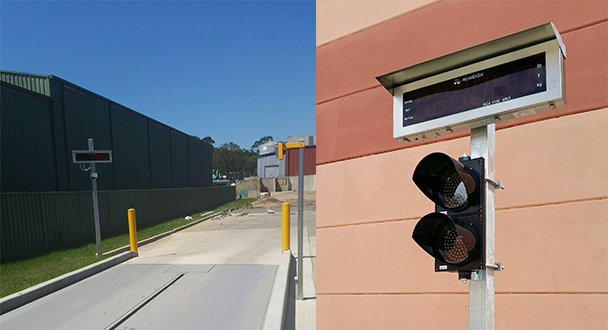
General Measure's remote displays are designed for truck scale with stainless steel outer casing, IP65 standard, and a high-quality guarantee. These remote displays with large, extremely bright digits are excellent for viewing from wide angles, and come complete with a stainless steel weather shield to provide exceptional viewing in direct sunlight.

It can be connected in several applications, most commonly to indicators that are connected to a weighbridge. This enables the truck driver and operator to easily viewed truck weights via the large 120mm or 65mm displays. The size of the large model GM8895 will be 905mm*295mm*258mm (with weather shield). The size of the small model GM8892 will be 582mm*228mm*200mm (with weather shield).

Some of these weighbridges are also configured with traffic light functions next to the remote display to instruct drivers on moving forward onto the weighbridge. Other applications, such as pallet weighing, is also an option for these remotes, enabling a forklift operator to easily weigh the weights when loading large items where the vision of the scale base may be impaired.

The remote displays offer unmatched flexibility with smart data recognition systems compatible with truck scale indicators, such as AD-4321, AD4323, TOLEDO, Fairbanks, R2500, UMC600, GSE50 serial, Rinstrum, WI-125, WI-127, DF1500, etc. For more communication information, please refer to the user manual on https://www.gmweighing.com/product/remote-display

Tuesday, July 20, 2021

GMT-P1 Set Point Demonstration


Welcome to General Measure's channel. Today's topic is GMT-P1 set point demonstration. In the industrial production process, it is necessary to control the equipment according to the weight in some circumstances. At this point, when using GMT-P1, we can use the setpoint to help to realize the control function.

Follow the video or follow the GMT-P1's user manual chapter 4.4 Set Point, we can set the relevant parameter of set point from P1.1 to P1.5. Please refer to the video for detailed steps.

To sum up,

①There are 3 conditions for set point signal output: stable condition, delay time, and condition of validity. The signal will be output only after all the selected conditions are set and satisfied.

②If the delay time is set, the timer starts from the last valid state. If the timing is completed in advance, it will immediately signal after waiting for other conditions to be met. If other conditions are met first, the signal will be output after the timing is completed.

③If more set points are needed to set, we can follow the above step to set relevant parameters.

④If the switch input function of the set point is defined, the state at set point 1 will become an invalid output state when the switch signal is valid. So the current displaying weight needs to be kept in a range that does not meet the set point conditions.