Monday, July 26, 2021

Robust Remote Displays for Reliability and Functionality


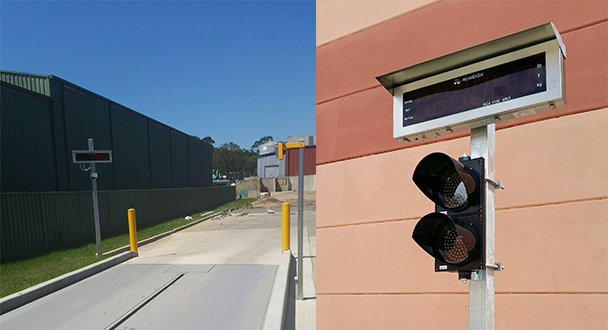
General Measure's remote displays are designed for truck scale with stainless steel outer casing, IP65 standard, and a high-quality guarantee. These remote displays with large, extremely bright digits are excellent for viewing from wide angles, and come complete with a stainless steel weather shield to provide exceptional viewing in direct sunlight.

It can be connected in several applications, most commonly to indicators that are connected to a weighbridge. This enables the truck driver and operator to easily viewed truck weights via the large 120mm or 65mm displays. The size of the large model GM8895 will be 905mm*295mm*258mm (with weather shield). The size of the small model GM8892 will be 582mm*228mm*200mm (with weather shield).

Some of these weighbridges are also configured with traffic light functions next to the remote display to instruct drivers on moving forward onto the weighbridge. Other applications, such as pallet weighing, is also an option for these remotes, enabling a forklift operator to easily weigh the weights when loading large items where the vision of the scale base may be impaired.

The remote displays offer unmatched flexibility with smart data recognition systems compatible with truck scale indicators, such as AD-4321, AD4323, TOLEDO, Fairbanks, R2500, UMC600, GSE50 serial, Rinstrum, WI-125, WI-127, DF1500, etc. For more communication information, please refer to the user manual on https://www.gmweighing.com/product/remote-display

Tuesday, July 20, 2021

GMT-P1 Set Point Demonstration


Welcome to General Measure's channel. Today's topic is GMT-P1 set point demonstration. In the industrial production process, it is necessary to control the equipment according to the weight in some circumstances. At this point, when using GMT-P1, we can use the setpoint to help to realize the control function.

Follow the video or follow the GMT-P1's user manual chapter 4.4 Set Point, we can set the relevant parameter of set point from P1.1 to P1.5. Please refer to the video for detailed steps.

To sum up,

①There are 3 conditions for set point signal output: stable condition, delay time, and condition of validity. The signal will be output only after all the selected conditions are set and satisfied.

②If the delay time is set, the timer starts from the last valid state. If the timing is completed in advance, it will immediately signal after waiting for other conditions to be met. If other conditions are met first, the signal will be output after the timing is completed.

③If more set points are needed to set, we can follow the above step to set relevant parameters.

④If the switch input function of the set point is defined, the state at set point 1 will become an invalid output state when the switch signal is valid. So the current displaying weight needs to be kept in a range that does not meet the set point conditions.


Tuesday, July 6, 2021

Configuration and Monitoring Weasy-APP of Mobile for General Measure Weighing Transmitter GMT-X1


General Measure weighing transmitter GMT-X1, a DIN rail mounted weighing transmitter for industrial automation, can be used in various industrial fields, such as chemical, concrete, and bitumen mixing, metallurgy smelting, lithium battery, feeds, etc.


Through Bluetooth, GMT-X1 can connect to a mobile app called Weasy (available for android systems) for configuration and monitoring. After the weighing transmitter installed on the spot, we need to do the calibration first. But in some fields, the weight scale is far away from the weighing transmitter. To save time and energy, we can use Weasy-app to calibrate the GMT-X1 and make sure it works properly. Moreover, when there is something wrong with the connection between PLC and weighing transmitters, we don’t need to check the weighing transmitter one by one. Just opening weasy-app to check the parameters comparing to PLC, we can easily find out which weighing transmitter is setting error and simply correct it. In this case, the production process won’t be delayed too long. Learn more about how to configure GMT-X1 by Weasy-App through the video.


Highlight Features:

• Stainless steel case with a compact design

• Different configuration choice with a variety of combination

• Standard: RS485+RS485/RS232(selectable)

Option1: 3 input 5 output or 3 input 4 output(relay)

Option2: RS485+16bit Analog or 2 input 4 output

Option3: Modbus TCP or Ethernet/IP or Profinet

(Option1,2,3 can be selected at the same time)

• Calibration without weights

• Printer function